Config & Web UI
Compile-time config (thesada_config.h)
#define FIRMWARE_VERSION "x.y.z"

// Enable/disable modules
#define ENABLE_TEMPERATURE
#define ENABLE_ADS1115
#define ENABLE_PMU           // AXP2101 power management
#define ENABLE_BATTERY       // battery monitoring (requires ENABLE_PMU)
#define ENABLE_SD
#define ENABLE_CELLULAR
#define ENABLE_TELEGRAM
#define ENABLE_WEBSERVER
#define ENABLE_SCRIPTENGINE
// #define ENABLE_PWM
// #define ENABLE_SHT31
// #define ENABLE_GNSS       // SIM7080G GNSS (requires ENABLE_CELLULAR)

// Board selection (set via PIO build_flags in platformio.ini)
// (default, no flag) - LILYGO T-SIM7080-S3 with the full module set
// BOARD_S3_BARE      - bare ESP32-S3 devkit (SHT31 bench target, no cellular/PMU/SD)
// BOARD_OWB_RESCUE   - minimum-flash recovery build, every optional module off
Runtime config (data/config.json)
See examples/config.json.example for all fields. Key sections:
{
  "device":      { "name": "thesada-node", "friendly_name": "Thesada Node", "heartbeat_s": -1, "heartbeat_pin": -1, "charging_led": true },
  "web":         { "user": "admin", "password": "changeme" },
  "wifi":        { "networks": [...], "timeout_per_ssid_s": 10, "wifi_check_interval_s": 900, "ap_password": "", "ap_timeout_s": 300 },
  "ntp":         { "server": "pool.ntp.org", "tz_offset_s": 3600 },
  "mqtt":        { "broker": "...", "port": 8883, "user": "...", "password": "...",
                   "topic_prefix": "thesada/node", "send_interval_s": 0,
                   "ha_discovery": true, "reboot_after_fails": 30, "max_exhaust_reboots": 3 },
  "temperature": { "pin": 12, "interval_s": 60, "auto_discover": true, "conversion_wait_ms": 750, "unit": "C", "sensors": [] },
  "ads1115":     { "i2c_sda": 1, "i2c_scl": 2, "address": 72, "interval_s": 60, "channels": [...] },
  "cellular":    { "apn": "APN", "sim_pin": "", "rf_settle_ms": 15000, "reg_timeout_ms": 180000, "activation_timeout_ms": 1800000 },
  "sd":          { "enabled": true, "pin_clk": 38, "pin_cmd": 39, "pin_data": 40 },
  "telegram":    { "bot_token": "", "chat_ids": [], "cooldown_s": 300, "alerts": [...] },
  "webhook":     { "url": "", "message_template": "..." },
  "battery":     { "enabled": true, "interval_s": 60, "low_pct": 20, "charge_ma": 300, "charge_v": 4.2 },
  "sleep":       { "enabled": false, "sleep_s": 300, "wake_s": 30 },
  "ota":         { "enabled": true, "manifest_url": "...", "check_interval_s": 21600, "cmd_topic": "thesada/node/cmd/ota" }
}
Web Interface
Accessible at http://[device-ip]/ - requires login (credentials from web config).
| Route | Method | Auth | Description |
|---|---|---|---|
/ |
GET | public | Live sensor dashboard with MQTT status bar |
/api/info |
GET | public | Firmware version, build date, device name |
/api/state |
GET | public | Current sensor readings as JSON (includes _mqtt metadata) |
/api/login |
POST | yes | Exchange credentials for a 1-hour Bearer token (max 4 concurrent) |
/api/auth/check |
GET | yes | Verify credentials (200 or 401, no token issued) |
/api/config |
GET | yes | Read config.json |
/api/config |
POST | yes | Write config.json, restart device (page auto-refreshes after 10s) |
/api/backup |
POST | yes | Copy config.json to SD card |
/api/files |
GET | yes | List files (?source=sd\|littlefs\|scripts) |
/api/file |
GET | yes | Read file (?path=...&source=sd\|littlefs\|scripts, max 64 KB) |
/api/file |
POST | yes | Write file (?path=...&source=..., body = file content) |
/api/file |
DELETE | yes | Delete file (?path=...&source=...) |
/api/cmd |
POST | yes | Run any Shell command, get JSON output |
/api/restart |
POST | yes | Reboot device |
/api/ws/token |
GET | yes | Issue a 30 s IP-bound WS auth grant (required before opening WebSocket) |
/ota |
POST | yes | Upload firmware .bin (push OTA, page auto-refreshes after 10s) |
/ws/serial |
WS | token | Bidirectional terminal - log stream + all Shell commands |
“yes” = Bearer token OR Basic Auth (backwards compatible). Every gated route resolves through the same check, so Bearer is accepted everywhere Basic is.
Cross-site rule. The browser replays cached Basic credentials on a
cross-origin request by itself, with no cooperation from the page. A Bearer
token has to be set by script, and this device sends no CORS headers, so a
cross-origin script cannot attach one. That asymmetry is the whole rule:
Basic does not count when the browser reports Sec-Fetch-Site: cross-site.
| Request shape | Basic | Bearer |
|---|---|---|
Same-origin, or no Sec-Fetch-Site (curl, scripts, pre-2020 browsers) |
accepted | accepted |
| Cross-site, GET/HEAD/OPTIONS | accepted | accepted |
| Cross-site, state-changing method | 401 | accepted |
Cross-site GET /api/ws/token or GET /api/auth/check |
401 | accepted |
The last row is not about the method: /api/ws/token mints a 30 s WS
grant and /ws/serial reaches the shell, and /api/auth/check tells a
caller whether cached credentials work on this device. Both declare the
side effect so the rule covers them.
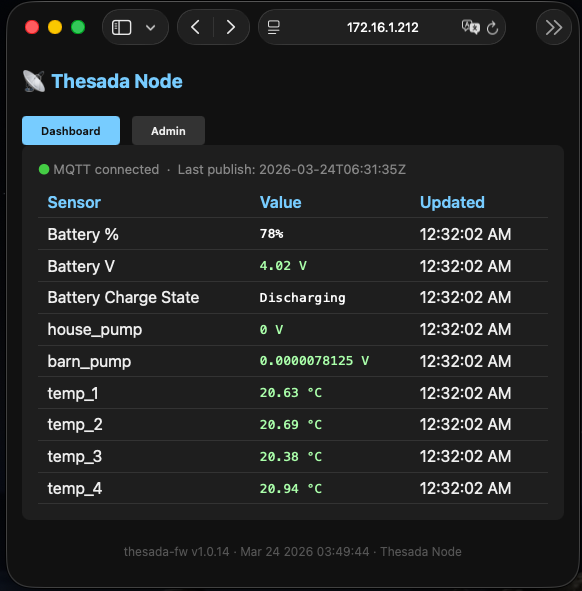
Dashboard - public read-only view:
- Sensor table polls
/api/stateevery 5 s - shows temperature, current, and battery (%, voltage, charge state) - MQTT status bar: green/red dot, connected state, last publish timestamp (from
_mqttkey in/api/state) - Battery rows color-coded: green when charging, red when below 20%
Admin terminal - auth-gated WebSocket terminal:
- Replays last 50 log lines on connect (server-side ring buffer) - terminal is never blank
- Streams all firmware log lines in real time after replay
- Log level filter: ALL / INF / WRN / ERR / DBG (client-side, 500-line ring buffer)
- Clear button; auto-reconnects on disconnect
- WebSocket auth: JS fetches
/api/ws/token(Bearer token) before opening the socket; the server grants the caller IP 30 s access;WS_EVT_CONNECTverifies and closes unauthenticated connections immediately - Token auth: dashboard uses
POST /api/loginto get a Bearer token stored in sessionStorage. Token persists across page refreshes, cleared on tab close or device reboot.
WebSocket / serial terminal commands: all Shell built-ins (see Shell & Scripting page). Type help for the full list.
SD Card Logging
Logs sensor events as CSV. On boot the module scans for the highest-numbered existing /logNNN.csv and resumes appending to it if it is under sd.max_file_kb; otherwise it opens the next free slot. Rotation is size-triggered only, never per-boot - a frequently-rebooting device no longer piles up near-empty log files.
File naming: /log001.csv, /log002.csv, … up to /log999.csv.
CSV format: timestamp,sensor,json_data
Subscribed sensors: temperature, current, battery. Each event publishes one CSV row. The battery row carries {"present":true,"voltage_v":4.18,"percent":100,"charging":false} - useful for outage debriefs since battery voltage is the only persistent post-mortem record.
Timestamp is ISO 8601 UTC (2026-03-22T14:32:00Z) when NTP is synced; falls back to ms/<millis> before sync.
Logrotate config (config.json):
"sd": {
  "enabled":     true,
  "max_file_kb": 1024
}
max_file_kb: 1024- rotate to the next file when current exceeds 1 MBmax_file_kb: 0- no size limit (file grows indefinitely until next boot)
On boot the log shows the resumed (or fresh) file and its on-disk size:
[INF][SD] Logging to /log690.csv (149106 B, max 10240 KB per file)
When a rotation happens the log shows:
[INF][SD] Rotating - /log001.csv full
[INF][SD] Logging to /log002.csv
Disable logging entirely via "sd": { "enabled": false }.
Config backup via /api/backup copies config.json to /config_backup.json on SD.
Logging
All Log::info/warn/error calls write to:
- Serial (USB CDC, 115200 baud)
- WebSocket
/ws/serial- all connected terminal clients receive each log line
Format - before NTP sync:
[INF][TAG] message
[WRN][TAG] message
[ERR][TAG] message
Format - after NTP sync (epoch > 1700000000):
[INF][2026-03-22T14:32:00Z][TAG] message
The timestamp is inserted between the log level and the tag. Log::write() checks time(nullptr) on every call; the format switches automatically once the clock is set. Run the net.ntp shell command to see the current sync status and whether log timestamps are active.