OWB Monitor - Home Assistant
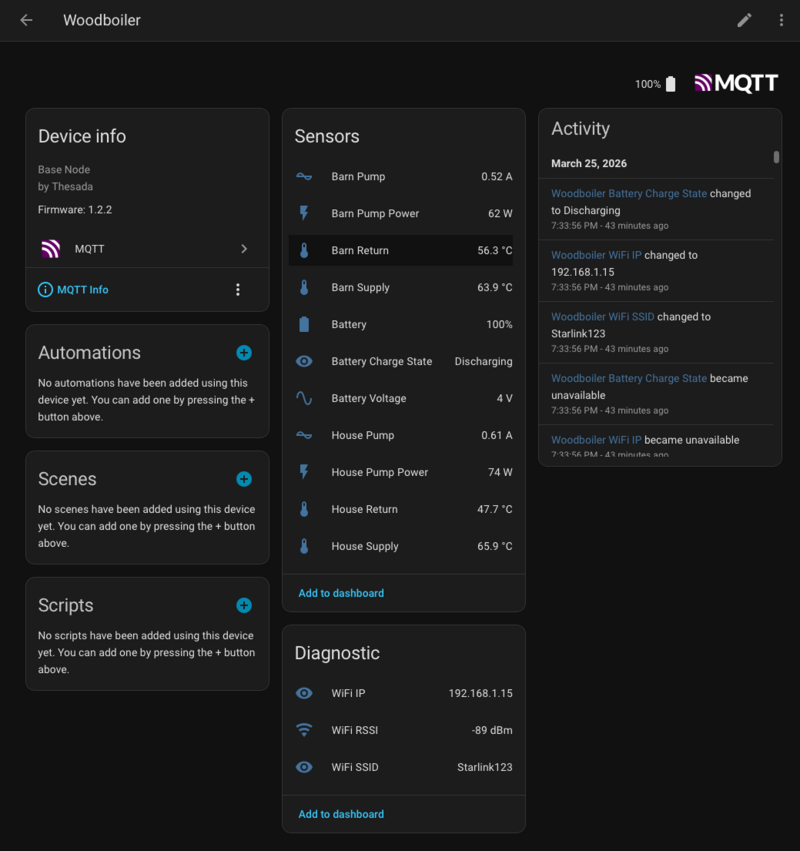
The OWB monitor publishes sensor data via MQTT. Home Assistant auto-discovers entities via MQTT discovery when mqtt.ha_discovery: true (the default) - no manual YAML required. Entities appear under Settings - Devices & Services - MQTT after the node connects.
Prerequisites
- OWB node flashed and online
- Mosquitto MQTT broker running
- Telegram bot configured (optional, for alerts)
1. MQTT Sensor Config
Auto-discovered entities:
| Entity | Type | Description |
|---|---|---|
| House Supply | temperature | House loop supply (C) |
| House Return | temperature | House loop return (C) |
| Barn Supply | temperature | Barn loop supply (C) |
| Barn Return | temperature | Barn loop return (C) |
| House Pump | current | House pump RMS current (A) |
| Barn Pump | current | Barn pump RMS current (A) |
| House Pump Power | power | House pump power (W) |
| Barn Pump Power | power | Barn pump power (W) |
| Battery | battery | Battery level (%) |
| Battery Voltage | voltage | Battery voltage (V) |
| Battery Charge State | text | Charging / Discharging |
| WiFi RSSI | signal_strength | WiFi signal (dBm, diagnostic) |
| WiFi SSID | text | Connected network (diagnostic) |
| WiFi IP | text | Device IP address (diagnostic) |
Each sensor publishes on its own topic (e.g. thesada/owb/sensor/temperature/house_supply). Availability via LWT on thesada/owb/status. WiFi diagnostics are disabled by default in HA.
Verify the node is publishing:
mosquitto_sub -h YOUR_BROKER -p 8883 \
  -u mqtt-user -P YOUR_PASSWORD \
  --capath /etc/ssl/certs \
  -t 'thesada/owb/#' -v
2. Firmware Alerts vs HA Automations
The firmware sends alerts directly to Telegram via the Bot API when configured with bot_token and chat_ids. Alert logic lives in /scripts/rules.lua on the device (Lua-driven, hot-reloadable). See Alerts & Webhook for details.
HA automations are a second layer - useful for:
- Cross-sensor logic (e.g. supply/return delta)
- Time-based conditions (heating season only)
- Telegram
/tempcommand responses
Both can run simultaneously.
3. Alert Automations (HA)
Three automations cover conditions the firmware alerts don’t handle well (cross-sensor, time-based). Create each via Settings - Automations - Create Automation - Edit in YAML.
Replace notify.YOUR_NOTIFY_ENTITY with your Telegram notify entity.
Supply Temperature Low
alias: OWB Supply Temp Low
description: Alert when boiler supply drops below 40C
trigger:
  - platform: numeric_state
    entity_id: sensor.owb_house_supply
    below: 40
action:
  - action: notify.YOUR_NOTIFY_ENTITY
    data:
      message: >-
        OWB Alert: Supply temp low -
        {{ states('sensor.owb_house_supply') | round(1) }}C. Check fire.
mode: single
Loop Delta Collapsed
alias: OWB Loop Delta Low
description: Alert when supply/return delta collapses below 5C
trigger:
  - platform: template
    value_template: >
      {{ (states('sensor.owb_house_supply') | float -
          states('sensor.owb_house_return') | float) < 5 }}
    for: "00:05:00"
action:
  - action: notify.YOUR_NOTIFY_ENTITY
    data:
      message: >-
        OWB Alert: House loop delta low.
        Supply: {{ states('sensor.owb_house_supply') | round(1) }}C
        Return: {{ states('sensor.owb_house_return') | round(1) }}C
mode: single
Pump Current Zero
alias: OWB Pump Current Zero
description: Alert when pump stops during heating season
trigger:
  - platform: state
    entity_id: binary_sensor.owb_house_pump_running
    to: "off"
  - platform: state
    entity_id: binary_sensor.owb_barn_pump_running
    to: "off"
condition:
  - condition: numeric_state
    entity_id: sensor.owb_house_supply
    above: 25
  - condition: template
    value_template: >
      {{ now().month >= 9 or now().month <= 5 }}
action:
  - action: notify.YOUR_NOTIFY_ENTITY
    data:
      message: >-
        OWB Alert: {{ trigger.to_state.attributes.friendly_name }} stopped.
        Supply: {{ states('sensor.owb_house_supply') | round(1) }}C.
        Possible pump failure.
mode: single
4. Telegram Bot Commands
alias: OWB Telegram /temp
description: Reply to /temp with current OWB readings
trigger:
  - platform: event
    event_type: telegram_command
    event_data:
      command: /temp
action:
  - action: notify.YOUR_NOTIFY_ENTITY
    data:
      message: >-
        OWB Readings:

        House: {{ states('sensor.owb_house_supply') | round(1) }} / {{ states('sensor.owb_house_return') | round(1) }}C
        Barn:  {{ states('sensor.owb_barn_supply') | round(1) }} / {{ states('sensor.owb_barn_return') | round(1) }}C
        Battery: {{ states('sensor.owb_battery_percent') }}% {{ states('sensor.owb_battery_charging') }}
mode: single
5. Dashboard
TODO: OWB dashboard YAML to be added after first real data is collected on site.